Quick answer
To raise workforce productivity with AI, start by measuring how work actually gets done, then point AI at the processes where that measurement shows the largest, provable loss of time and cost. Most enterprises have skipped the first step. McKinsey’s State of AI 2026 found that only 37% of organizations attribute any EBIT impact to AI, a share essentially unchanged from 2025. A process-level baseline lets leaders choose which work SHOULD be automated, give AI agents the business context they need and verify the savings in the P&L.
Key takeaways
- AI adoption is widespread, but financial results are not. Only 37% of organizations report any EBIT impact from AI, according to McKinsey.
- Executive buyers have moved past tool categories and now judge AI on what it does to cost and revenue.
- Every executive question about AI depends on one input: a baseline of how long work takes and what it costs.
- Separate what CAN be automated from what SHOULD be, using ROI per process, before funding agents.
- Measure at process and team level, with privacy-by-design architecture.
- Qatar Airways reached self-funded ROI in two months, with Finance co-authoring the business case from day one.
Why AI has not moved workforce productivity yet
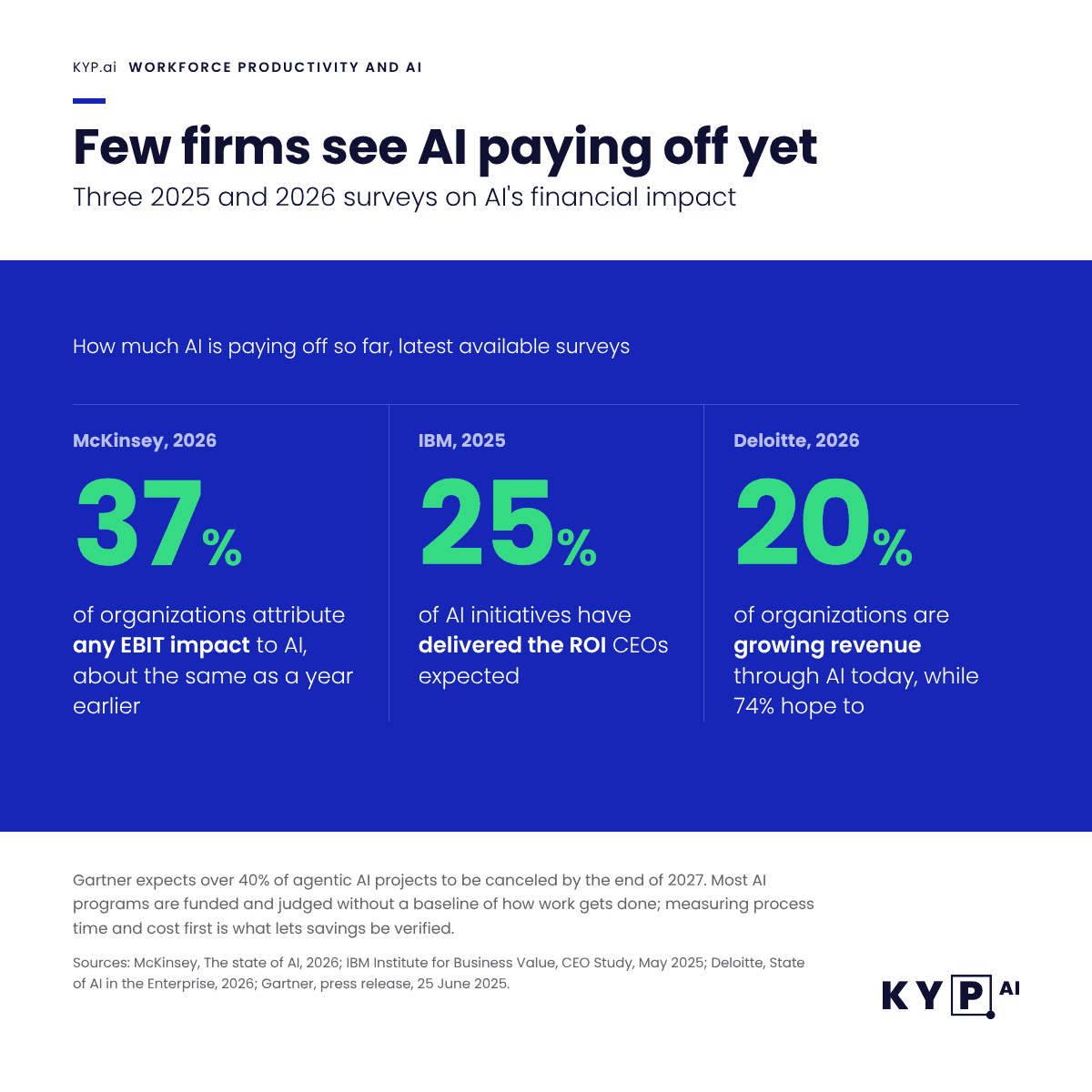
The gap between AI activity and AI results is now well documented. The figures below come from recent surveys of executives and finance leaders, plus Gartner’s forecasts for the next two years.
| Finding | Source |
| 37% of organizations attribute at least some EBIT impact to AI, about the same share as a year earlier | McKinsey, The state of AI in 2026 (August 2026) |
| 74% of organizations hope to grow revenue through AI; 20% are already doing so | Deloitte, State of AI in the Enterprise (2026) |
| CEOs report that only 25% of AI initiatives have delivered the expected ROI | IBM Institute for Business Value CEO Study (May 2025) |
| 63% of finance organizations said AI implementation was slower than expected in 2025 | Gartner (May 2026) |
| Over 40% of agentic AI projects will be canceled by the end of 2027, due to escalating costs, unclear business value or inadequate risk controls | Gartner (June 2025) |
| Through 2026, organizations will abandon 60% of AI projects unsupported by AI-ready data | Gartner (February 2025) |
The potential is not in doubt. The McKinsey Global Institute estimates that today’s technology could, in theory, automate activities accounting for about 57% of US work hours. The problem sits between potential and proof.
KYP.ai’s reading of these numbers is that most AI programs are funded and judged without a baseline of how work actually gets done. Gartner’s May 2026 guidance to finance chiefs makes the same point from the finance side: CFOs must stop mistaking AI deployment for value creation. When nobody measured how long a process took before AI arrived, nobody can show what AI changed. The pilots may well be working; the evidence that would prove it was never collected.
What each executive is really asking
Executive buyers rarely ask for process mining or task mining by name. They ask about money. The same AI program has to answer three different questions, and each one needs different evidence.
| Executive | The question behind the AI budget | Metric that answers it | Evidence it needs |
| CEO | Where will AI create revenue or capacity we can sell? | Revenue per employee, time to serve, capacity redeployed to growth work | Which teams spend the most time on work that does not reach the customer |
| CFO | Which costs will actually fall, and when? | Cost per transaction, hours recovered, payback period, verified savings against a baseline | A pre-investment baseline of how long each process takes and what it costs |
| COO | Can we absorb growth without adding headcount? | Productive capacity, backlog, cycle time, workload balance across teams | Continuous data on where capacity is lost to rework, waiting and manual handoffs |
| Chief AI Officer | Which processes are ready for agents, and what context do agents need? | Automation potential per process, agent success rate in production | Step-level detail of how people handle exceptions, systems and decisions |
The common thread is a baseline, which is why process intelligence for CFOs starts there. Without one, a CFO cannot verify savings, a COO cannot see recovered capacity and an AI team cannot prove an agent did better than the people it supports.
Five steps to raise workforce productivity with AI
1. Establish a baseline of how work actually gets done
Start with measurement. Capture how long core processes take, which applications they cross, where work waits and how much of each role goes to repetitive handling. Interviews and process documentation describe the intended process; they consistently miss the time spent moving data between applications.
This is the layer process intelligence adds, and KYP.ai calls it ground truth: observed work at the desktop level, captured continuously and anonymized at source. It replaces the proxies most programs rely on today, such as surveys or event logs from a single system.
2. Find where productive capacity is lost
With a baseline in place, rank the losses. Typical sources include manual data transfer between systems, approval queues, duplicated checks and high-volume tasks handled differently in each team. Quantify each one in hours and cost, so the conversation moves from anecdotes to a ranked list.
3. Separate what CAN be automated from what SHOULD be
Almost any repetitive task can be automated. Far fewer are worth automating once you account for volume, variation, exception rates and change cost. KYP.ai’s Business Transformation Engine attaches a calculated ROI and payback period to each opportunity (the ROI calculator gives a first estimate), which turns the automation pipeline from a wish list into an investable portfolio.
4. Give AI agents the business context they need
Agents fail in production when they meet the exceptions and edge cases nobody documented, which is the gap agentic process intelligence is built to close. The same process data that built the business case also tells an agent how the work is really done. KYP.ai generates production-ready agent code from that context and exposes process intelligence to large language models through MCP (Model Context Protocol). The code is platform agnostic by design: deployable on UiPath, SAP Joule, n8n, Camunda, Power Automate, ServiceNow, CrewAI or whichever agentic platform you already run. No lock-in.
5. Measure against the baseline and redeploy the capacity
Productivity gains only become financial results when the freed capacity goes somewhere. Track hours recovered per process against the original baseline, then decide deliberately where that capacity goes. Report it to the board like any other investment, with spend set against verified return.
Measure productivity with privacy by design
Any program that measures how work gets done raises a fair question from employees and works councils: is this surveillance? The answer depends on architecture and intent, so settle both before you deploy.
- Measure at process and team level. Decisions about capacity and automation need process-level and team-level data.
- Anonymize at the source. KYP.ai is privacy-by-design: sensitive data is anonymized on the workstation before it ever leaves the device, and no sensitive information is processed or transferred externally.
- Configure what is captured. Granular configuration lets each organization define exactly what is and is not collected, in line with GDPR and local works council agreements.
- Share the purpose. Tell employees what is measured and how the freed capacity will be used. Programs that redeploy time to better work earn trust faster than programs framed as cost cutting alone.
KYP.ai is GDPR, SOC 2 Type II and ISO 27001 compliant, which most enterprise security reviews ask about early. Ask any vendor for the same evidence before a pilot starts.
What it looks like in practice
Two KYP.ai customers show the pattern at enterprise scale. In both cases the customer made the decisions; KYP.ai supplied the data.
Qatar Airways brought Finance in from day one and made them co-authors of the business case. Its process intelligence program reached self-funded ROI in two months, against an industry norm of 18-24 months, and digital presence across the operation rose from under 50% to over 84%. The program carries $100M in targeted benefits. John Adamek summed up the operating model: “Process intelligence shows you the truth. AI helps you act on it. Finance helps you fund it.”
Atos, running KYP.ai as Client Zero, identified a 25% FTE productivity improvement in Purchasing and 56% automation potential, and built a pipeline of more than 400 use cases across its business functions. Atos already had governance. The gap was visibility, which Pete Evans summed up this way: “Visibility made ROI defensible. ROI gave us investment discipline.”
A board-ready scorecard for AI productivity
Use one scorecard across every AI and automation initiative, so results stay comparable from quarter to quarter. The baseline from step one feeds every row.
| Metric | What it shows | How to measure it |
| Hours recovered per process | Capacity released by automation or redesign | Baseline time per case minus current time per case, times volume |
| Cost per transaction | Whether unit cost is actually falling | Fully loaded process cost divided by completed cases |
| Capacity redeployed | Where freed time went (growth work, customer work or reduced cost) | Share of recovered hours reassigned, by destination |
| Payback period | How fast each initiative returns its investment | Initiative cost divided by verified monthly savings |
| Agent production rate | Whether AI moves beyond pilots | Share of agent use cases running in production with measured outcomes |
| Time to insight | How quickly the organization can see a change | Days from deployment to statistically relevant data |
How fast this can move
KYP.ai works to a four-stage deployment model: setup in minutes, live in days, statistically relevant insights in three weeks and measurable returns in 90 days. That timeline matters for executives who need to show AI results inside a single budget cycle.
The bottom line
- AI raises workforce productivity only when the time it frees shows up in cost, capacity or revenue.
- A baseline of how work actually gets done is the prerequisite for every business case and every agent deployment.
- Decide what SHOULD be automated, not just what CAN be, using ROI per process.
- Measure processes and teams with privacy-by-design architecture, and tell employees how freed capacity will be used.
- Report AI like any other investment: spend, verified return and payback.
Most environments are live within days. Book a demo to see where capacity is going in yours.
Frequently asked questions about workforce productivity
Workforce productivity is the output an organization produces relative to the time and cost of the people doing the work. In knowledge work it is best measured at the process level: cost per transaction, cycle time, hours per case and how much productive capacity goes to work that reaches the customer.
AI improves workforce productivity by taking over repetitive handling and giving people better information at the point of work. The gains become measurable only when an organization knows how long each process took before AI arrived and tracks where the freed capacity goes afterwards.
Most companies fund AI without a baseline of how work actually gets done, so they cannot prove what changed. McKinsey found that only 37% of organizations attribute any EBIT impact to AI, and Gartner expects over 40% of agentic AI projects to be canceled by the end of 2027, citing unclear business value among the reasons.
Measure hours per case and cost per transaction for each process before deployment, then measure the same metrics afterwards. Report hours recovered and payback period per initiative, so AI results sit on the same scorecard as any other investment.
CFOs should ask what the process costs today, how much of it an agent can realistically handle, what the payback period is and how the savings will be verified. If the business case cannot answer the first question with measured data, the remaining answers are estimates.
Measure at the process and team level, and use architecture that anonymizes data at the source. KYP.ai anonymizes sensitive data on the workstation before it leaves the device and lets each organization configure exactly what is captured, in line with GDPR and works council agreements.
Three groups of tools work together: process intelligence platforms that measure how work gets done and quantify ROI (such as KYP.ai), automation and agentic platforms that execute the work (such as UiPath, Power Automate, ServiceNow or SAP Joule) and analytics tools that report results. KYP.ai sits in the first group and generates platform-agnostic agent code for the second.
With KYP.ai, setup takes minutes, deployment takes days, statistically relevant insights arrive within three weeks and measurable returns follow within 90 days. Qatar Airways reached self-funded ROI in two months.
Get your process intelligence with the ROI attached - Book a demo!
Book Demo

 Szymon Kozak
 Wojciech Zytkowiak-Wenzel



 Adam Bujak
 Felix Haeser