Quick answer
The right process mapping tool for a large enterprise depends on the job the maps have to do. Choose an enterprise modeling suite such as SAP Signavio or iGrafx when you need a governed process repository with formal review and approval workflows and BPMN modeling. Choose Microsoft Visio, Lucidchart or Miro when the goal is fast, collaborative diagramming that business teams can pick up quickly. Choose a process intelligence platform such as KYP.ai when you need maps built from how work is actually done at the desktop level. Large organizations are usually best served by two of the three: one tool to design and govern the target process, and one to show the real one.
Key takeaways
- Large enterprises rarely fail at drawing maps. They fail at keeping hundreds of maps current and governed.
- Score tools on seven criteria before you look at features: notation, repository and governance, collaboration, integration, evidence of the real process, security and total cost of ownership.
- Diagramming tools win on adoption and price. Modeling suites win on governance. Neither tells you whether the map matches reality.
- Process intelligence closes that gap by capturing how work is done at the desktop level. Mindsprint onboarded more than 600 processes this way across 1,200+ employees.
- Run a 30-day pilot on one cross-functional process with a named owner before you sign an enterprise license.
What changes when a large enterprise maps its processes
A team of 50 can map its work on a whiteboard and keep the result in a shared folder. An organization with 20,000 employees across several countries cannot. Four things change at that scale, and each one should shape your shortlist.
Volume. Large enterprises run hundreds of distinct processes, with regional and product variants of each. The tool has to store and reuse them, which calls for a searchable repository.
Ownership and approval. Maps become controlled documents once they feed audits, SOX controls or ISO certifications. You need named owners, review cycles and a visible approved version.
Standards. When several business units and consulting partners map in parallel, a shared notation (usually BPMN 2.0) and a shared modeling convention matter more than any single feature. Agree on both before the first workshop, because retrofitting conventions across hundreds of maps is slow.
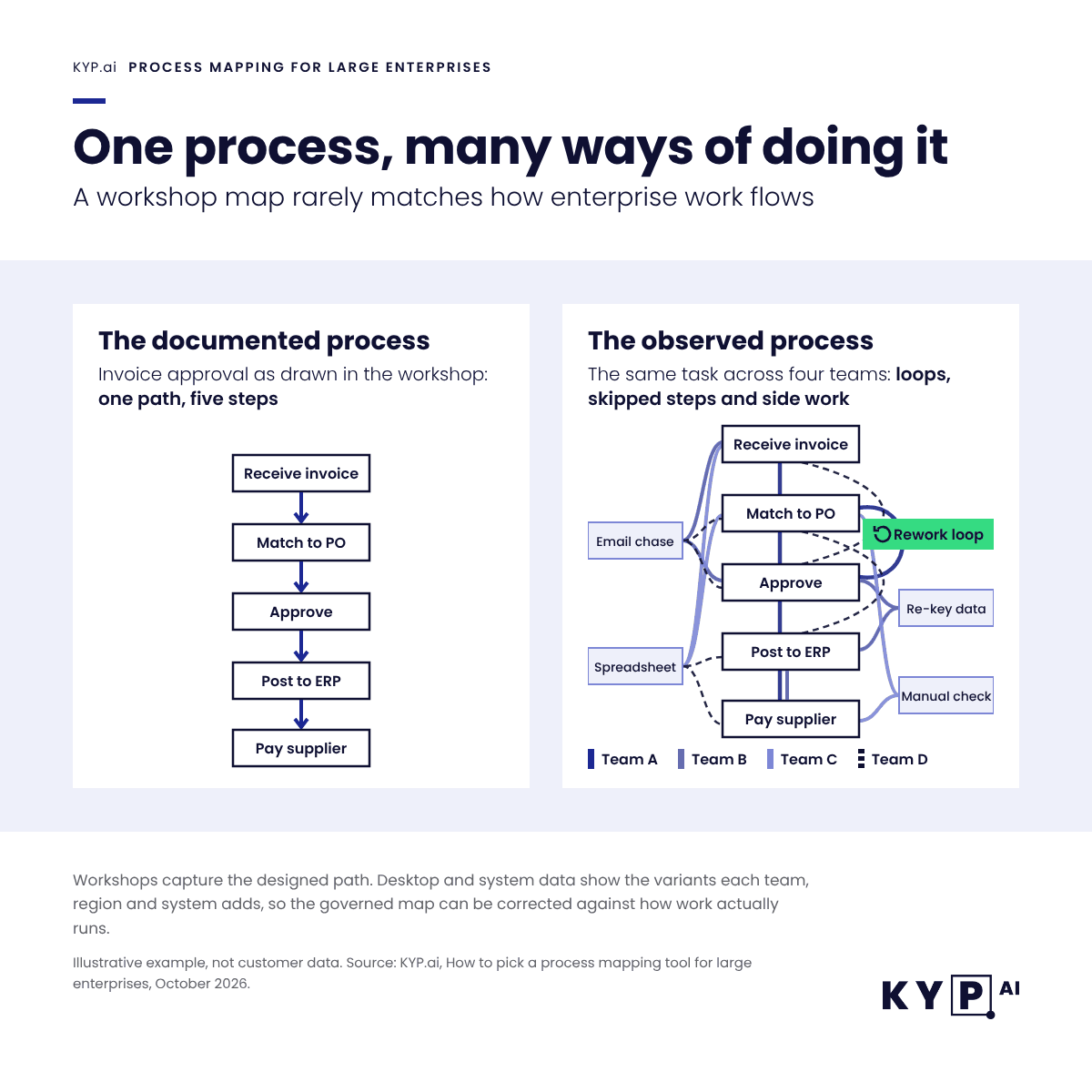
Drift. Every documented process starts aging the day it is approved. Systems change and teams find workarounds. At enterprise scale nobody can re-interview every team each quarter, so the map and the operation quietly diverge.
The first three are solved problems for the mature modeling suites. The fourth is where most enterprise mapping programs lose value, and it is the main reason to look beyond diagramming when you evaluate tools.
Seven criteria for choosing an enterprise process mapping tool
Use these criteria to score every tool on your shortlist. The weights reflect what tends to decide enterprise programs; adjust them to your own priorities before you start the evaluation.
| Criterion | What to check | Suggested weight |
| Notation and modeling depth | BPMN 2.0 support, plus value chains, EPC or swimlanes if your organization uses them | 15% |
| Repository and governance | Central library, object reuse, version history, review and approval workflows, named process owners | 20% |
| Collaboration and adoption | Browser access, commenting, ease of use for business users who are not modelers | 15% |
| Integration | Links to ERP, ITSM, document management and automation platforms; import and export of BPMN files | 10% |
| Evidence of the real process | Ability to compare documented maps with how work is actually performed, through process mining, task mining or desktop capture | 20% |
| Security and deployment | SSO and SAML, role-based access, data residency, SaaS or private cloud options, certifications | 10% |
| Total cost of ownership | License model, modeler versus viewer pricing, implementation services, training and ongoing administration | 10% |
Two practical notes on scoring. First, separate modeler seats from viewer seats when you price. Enterprise rollouts usually have a small group of trained modelers and thousands of readers, and pricing models treat those groups very differently. Second, give “evidence of the real process” its own line. If you fold it into “features”, it disappears behind the long feature lists of the modeling suites.
The three types of process mapping tools used by enterprise
Every tool on an enterprise shortlist falls into one of three groups. Knowing which group you are buying from prevents the most common mistake, which is expecting a diagramming tool to govern or a modeling suite to discover.
| Type | What it does well | Where it falls short | Typical buyer |
| Collaborative diagramming (Visio, Lucidchart, Miro) | Fast adoption, low cost per user, strong for workshops and one-off documentation | Limited governance; maps are drawn from what people say, so accuracy depends on the interview | Business teams, project managers, consultants |
| Enterprise modeling and process management suites (SAP Signavio, iGrafx, IBM Blueworks Live, Bizagi) | Central repository, BPMN depth, approvals, compliance and process architecture | Heavier rollout; maps still reflect the designed process unless paired with mining data | Process excellence, BPM center of excellence, compliance |
| Process intelligence (KYP.ai) | Builds maps from observed work across desktops, applications and systems; quantifies time, cost and automation potential | Not a drawing tool; it complements the repository you govern in | Operations, transformation and automation leaders |
How to run the evaluation
A structured 30-day evaluation beats a long RFP for this category, because the differences that matter only show up when real users map a real process. Keep the scope narrow so the comparison stays fair.
- Pick one cross-functional process. Order-to-cash, procure-to-pay or claims handling work well because they cross teams and systems and have measurable outcomes.
- Name an owner and a sponsor. The owner judges map quality. The sponsor decides whether the result changes anything.
- Map it two ways. Have modelers document the process in the candidate tool from workshops, and run desktop or system capture on the same process in parallel.
- Compare the two versions. Count the variants and workarounds that appear in the captured data but not in the workshop map.
- Test governance. Push a change through review and approval, then check what readers see.
- Price the full rollout. Model the cost for your real modeler and viewer counts over three years, including services.
The comparison in step four is usually the most revealing hour of the evaluation. It shows how much of the real process your current mapping method misses before you scale it to hundreds more.
Top process mapping tools for large enterprise organizations
The eight tools below cover the three types above and appear most often on enterprise shortlists. Each entry uses the same fields so you can compare them directly. For smaller teams and free options, the broader process mapping tools comparison covers 11 tools.
Methodology. Compiled by the KYP.ai content team. Each tool was assessed against the seven criteria above using the vendor’s own product, documentation and pricing pages, public UK G-Cloud procurement listings and the Gartner Peer Insights Enterprise Business Process Analysis Tools market. Prices are list prices where the vendor publishes them and are shown in the currency of the source. KYP.ai is listed first as the publisher’s own product, and its limits are stated as plainly as the others’. Last verified: October 21, 2026.
| Tool | Type | Best for | Deployment | Pricing model |
| KYP.ai | Process intelligence | Maps built from how work is actually done across desktops and systems | SaaS | Enterprise license sized to scope; ROI modeled up front |
| SAP Signavio | Modeling, governance and process mining suite | SAP-centric enterprises that want modeling, governance and system-based process mining in one suite | SaaS (public cloud) | Per user per year |
| iGrafx Process360 Live | Process intelligence and modeling | Repository-based modeling with formal governance cycles | Not published by the vendor | Quote-based |
| IBM Blueworks Live | Process modeling (SaaS) | BPMN-based process discovery workshops at scale | SaaS, with an optional private installation | Per user per month |
| Bizagi Modeler | BPMN modeler | Free BPMN modeling, with a paid cloud library | Desktop (free); cloud library on the Bizagi platform | Free modeler; platform by quote |
| Microsoft Visio | Diagramming | Microsoft 365 organizations that need standard notation | Web, plus desktop app on Plan 2 | $5 or $15 per user per month |
| Lucidchart | Diagramming | Cross-team collaborative diagramming with process governance add-ons | SaaS | Tiered per-user plans |
| Miro | Collaborative whiteboard | Workshops and fast, AI-assisted first drafts | SaaS | $0 to $20 per member per month, Enterprise custom |
1. KYP.ai
KYP.ai: process mining + task mining in one platform for full work visibility, and the process intelligence layer for agentic AI readiness. KYP.ai records how work actually moves through the tools people use, anonymizes it at source and turns it into discovered process maps with real volumes and durations per variant.
- Best for: Enterprises with 1,000+ knowledge workers that need evidence of how processes really run before they standardize or automate them.
- Deployment: SaaS, on a four-stage model: setup in minutes, live in days, statistically relevant insights in three weeks and measurable returns in 90 days.
- Pricing model: Enterprise license sized to the scope of the deployment. The KYP.ai ROI calculator estimates the return before you commit, and every automation opportunity in the platform arrives with a calculated ROI and payback period.
- When it isn’t the right fit: KYP.ai is not a drawing or BPMN design tool, so you will still want a modeling or diagramming tool for the approved target process. It also requires a lightweight agent on workstations, which means involving IT security and, in many European countries, works councils early.
2. SAP Signavio
SAP describes SAP Signavio Process Manager as “intuitive, cloud-based and professional process modeling” that allows “modeling BPMN 2.0 without previous knowledge.” SAP Signavio Process Governance automates approvals and publishes processes automatically once they are approved, and SAP Signavio Process Intelligence adds process mining with pre-built connectors for SAP and non-SAP systems.
- Best for: SAP-centric enterprises that want process modeling, governance and system-based process mining in one suite.
- Deployment: SaaS on public cloud, per SAP’s UK G-Cloud listing.
- Pricing model: Per user per year; the same G-Cloud listing shows £2,000 a user a year.
- When it isn’t the right fit: Signavio’s process mining reads what SAP and other systems record, so steps done in email, spreadsheets and desktop tools between transactions need a second source such as KYP.ai. Teams that only need lightweight diagramming will find a full suite more than they need.
Good thing to note: SAP Signavio and KYP.ai compliment each other. KYP.ai is an official SAP partner through SAP PartnerEdge and integrates with SAP Signavio as the agentic process intelligence layer: Signavio mines the backend systems, and KYP.ai captures the work that happens around them on the desktop.
3. iGrafx Process360 Live
iGrafx describes Process360 Live as “the end-to-end process intelligence platform integrating process mining, design and simulation” on its product page. Its business process management page covers BPMN, value stream and customer journey models, a process repository and “automated governance cycles for review, approval, endorsement, and acknowledgement.” Pia, its AI assistant, creates process models from natural language or uploaded documents.
- Best for: Process excellence teams that want repository-based modeling with formal sign-off cycles and built-in mining.
- Deployment: Not stated on the iGrafx product pages reviewed; confirm hosting options with the vendor.
- Pricing model: Quote-based; no list prices are published.
- When it isn’t the right fit: Organizations looking for a quick, low-cost diagramming rollout to thousands of casual users.
4. IBM Blueworks Live
The UK G-Cloud 14 listing for IBM Blueworks Live describes it as “an easy-to-use business process discovery and process modelling tool,” delivered as software as a service with an optional private installation. It imports BPMN 2.0 and Visio files, exports to BPMN and keeps models in a central repository. In June 2026 IBM added a Blueworks Live IQ technology preview that creates process blueprints from plain-language descriptions or pasted meeting notes.
- Best for: Organizations that want business users to document processes in a browser, with a central repository, without a heavy modeling suite.
- Deployment: SaaS, or an optional private installation in an IBM data center.
- Pricing model: £10 to £50 per user per month on the G-Cloud 14 listing.
- When it isn’t the right fit: Programs that need deep enterprise architecture modeling or built-in process mining. The AI blueprint features are still technology previews.
5. Bizagi Modeler
Bizagi states that its Modeler “adheres to the BPMN standard” and offers a free version for process modeling. The Modeler “is not sold separately. It is included as part of the Bizagi PaaS Platform,” which adds the cloud collaboration features.
- Best for: Teams that need standards-compliant BPMN at no license cost, or organizations already running the Bizagi platform.
- Deployment: Free desktop modeler; cloud collaboration through the Bizagi platform.
- Pricing model: Free modeler; the platform is priced by quote.
- When it isn’t the right fit: Enterprises that need a governed, organization-wide repository without committing to the wider Bizagi platform.
6. Microsoft Visio
Visio Plan 2 costs $15 per user per month, paid yearly, and includes templates that support BPMN 2.0 plus the desktop app on up to five PCs. Visio Plan 1 costs $5 per user per month and is web only.
- Best for: Microsoft 365 organizations that need standard notation and familiar tooling for documentation.
- Deployment: Visio for the web, plus the desktop app on Plan 2.
- Pricing model: $5 or $15 per user per month, paid yearly (US list prices).
- When it isn’t the right fit: Visio’s plan pages do not describe a process repository or approval workflows, so large programs usually add a modeling suite or a document management layer for ownership and sign-off.
7. Lucidchart
Lucidchart generates diagrams from text prompts with Lucid AI, and its Process Accelerator add-on aims to “standardize and improve governance of process documentation,” according to Lucid. Lucid supports SAML authentication through any identity provider.
- Best for: Cross-functional teams that want fast, browser-based collaborative diagramming, with an add-on for process documentation governance.
- Deployment: SaaS.
- Pricing model: Tiered per-user plans; Lucid offers Free, Individual, Team and Lucid Suite Enterprise plans.
- When it isn’t the right fit: Programs that need deep BPMN modeling or a formal process architecture. Lucid’s product page lists BPMN as a process flow template, so confirm BPMN 2.0 conformance if your modelers depend on it.
8. Miro
Miro supports flowcharts, BPMN diagrams, value stream maps and swimlanes on its process mapping page, and Miro AI turns meeting notes, outlines or an existing SOP into a structured process map. Enterprise customers get SCIM provisioning and EU, US or AU data hosting. Miro’s pricing runs from free to $8 (Starter) and $20 (Business) per member per month billed yearly, with custom Enterprise pricing from 30 members. SAML SSO is included in Business and Enterprise.
- Best for: Workshops and fast first drafts of a process with many stakeholders in the room.
- Deployment: SaaS, with data residency options for Enterprise.
- Pricing model: $0 to $20 per member per month, Enterprise custom.
- When it isn’t the right fit: Miro is a collaboration canvas, not a process repository. Approved process versions usually need to live in a governed tool.
Which combination fits which enterprise
| If your priority is | Start with | Add |
| Compliance and controlled process documentation | SAP Signavio or iGrafx Process360 Live | KYP.ai to check documented processes against real execution |
| Broad adoption at low cost | Microsoft Visio or Lucidchart | A repository for approved versions as the library grows |
| Workshops and transformation design | Miro | KYP.ai to replace interview data with observed data |
| Automation and AI agent readiness | KYP.ai | Your existing modeling tool for the target process design |
Why maps drift, and how process intelligence keeps them honest
A process map is a drawing of the process as someone remembered it on the day of the workshop. That is useful for design and for compliance. Wil van der Aalst, one of the founders of process mining, put the limitation simply in Process Mining: Overview and Opportunities: “even when procedures have been documented, reality may be very different.” It is weak evidence for decisions about cost or automation, because those decisions depend on the exceptions and manual workarounds that rarely make it into the diagram.
Process intelligence approaches the problem from the data side. KYP.ai captures how work actually flows across the applications people use, continuously and anonymized at source. The output is a set of discovered processes with real volumes, durations, variants and handoffs, plus a calculated ROI for each improvement or automation opportunity. For an enterprise mapping program, that changes three things:
- Coverage. Discovery also covers the processes nobody has had time to workshop.
- Accuracy. Variants and workarounds appear in the data, so the governed map can be corrected against observed data.
- Next steps. The same data ranks what SHOULD be automated, not only what CAN be, and KYP.ai generates production-ready agent code that is platform agnostic by design.
Mindsprint shows the scale effect. The team onboarded more than 600 processes across 1,200+ employees. Krishna Ramkrishnan described the alternative plainly: “Performing value stream mapping manually for all those processes with a team of 5 people would approximately take me 15 years.” KYP.ai works to a four-stage deployment model: setup in minutes, live in days, statistically relevant insights in three weeks and measurable returns in 90 days.
The bottom line on process mapping solutions for enterprise
- Decide first which job the maps must do: design, governance or evidence of how work actually runs.
- Score tools on seven weighted criteria, and give evidence of the real process its own line.
- Expect to pair a modeling suite or diagramming tool with process intelligence once you pass a few hundred processes.
- Prove the choice in a 30-day pilot on one cross-functional process before you commit to enterprise licenses.
Most environments are live within days. Book a demo to see what discovered process maps look like for yours.
Frequently asked questions
There is no single best tool, because enterprises buy mapping tools for different jobs. KYP.ai is the strongest fit when maps must reflect how work is actually done across desktops and applications. Signavio and iGrafx suit governed process repositories, IBM Blueworks Live and Bizagi suit BPMN modeling at scale, and Microsoft Visio, Lucidchart and Miro suit fast collaborative diagramming.
Look for BPMN 2.0 support, a central repository with version control and approvals, browser-based collaboration, integration with ERP and automation platforms, enterprise security such as SSO, and a way to compare documented maps with real execution data. Price modeler and viewer seats separately
Process mapping documents how a process is designed or believed to run, usually through workshops and interviews. Process mining reconstructs how it actually runs from system event logs, and task mining adds the desktop-level steps between systems. KYP.ai combines process mining and task mining in one platform for full work visibility.
Yes, in two different ways. Some diagramming tools use AI to draft a diagram from a text prompt, which speeds up drawing but still reflects what someone described. Process intelligence platforms such as KYP.ai discover processes from observed work data, so the map shows what actually happened.
Continuous automated discovery replaces most of the interview and workshop effort that consulting-led mapping relies on. A consulting engagement delivers a point-in-time view built from interviews, while process intelligence keeps running after the first map is complete.
AI agents and automation need maps that match real execution, including exceptions and edge cases. Pair a governed repository for the approved process with process intelligence data that shows how work actually runs, so agents are designed and monitored against observed execution data.
Get your process intelligence with the ROI attached - Book a demo!
Book Demo

 Wojciech Zytkowiak-Wenzel
 Szymon Kozak



 Adam Bujak
 Felix Haeser